Most ecommerce creative “pipelines” are not pipelines. They are tab archaeology: upload in one tool, restyle in another, upscale somewhere else, crop in Canva, rename in Drive, lose the brief by Thursday.
That is why the same SKU looks like three brands across feed, story, and PDP. The model did not forget your brand. You never stored the path.
AI workflow builder ecommerce work starts when you stop treating each step as a separate app and start treating it as a node — a named job with inputs, rules, and a gate before the next job runs.
Key Takeaways
>
– Node thinking means every creative step is a contract: input asset, brand rule, output job, pass/fail gate.
– Adobe’s 2026 Creators’ Toolkit Report found 60%+ of creators juggle multiple creative AI tools in a quarter — sprawl without a builder is how identity drifts (Adobe, 2026).
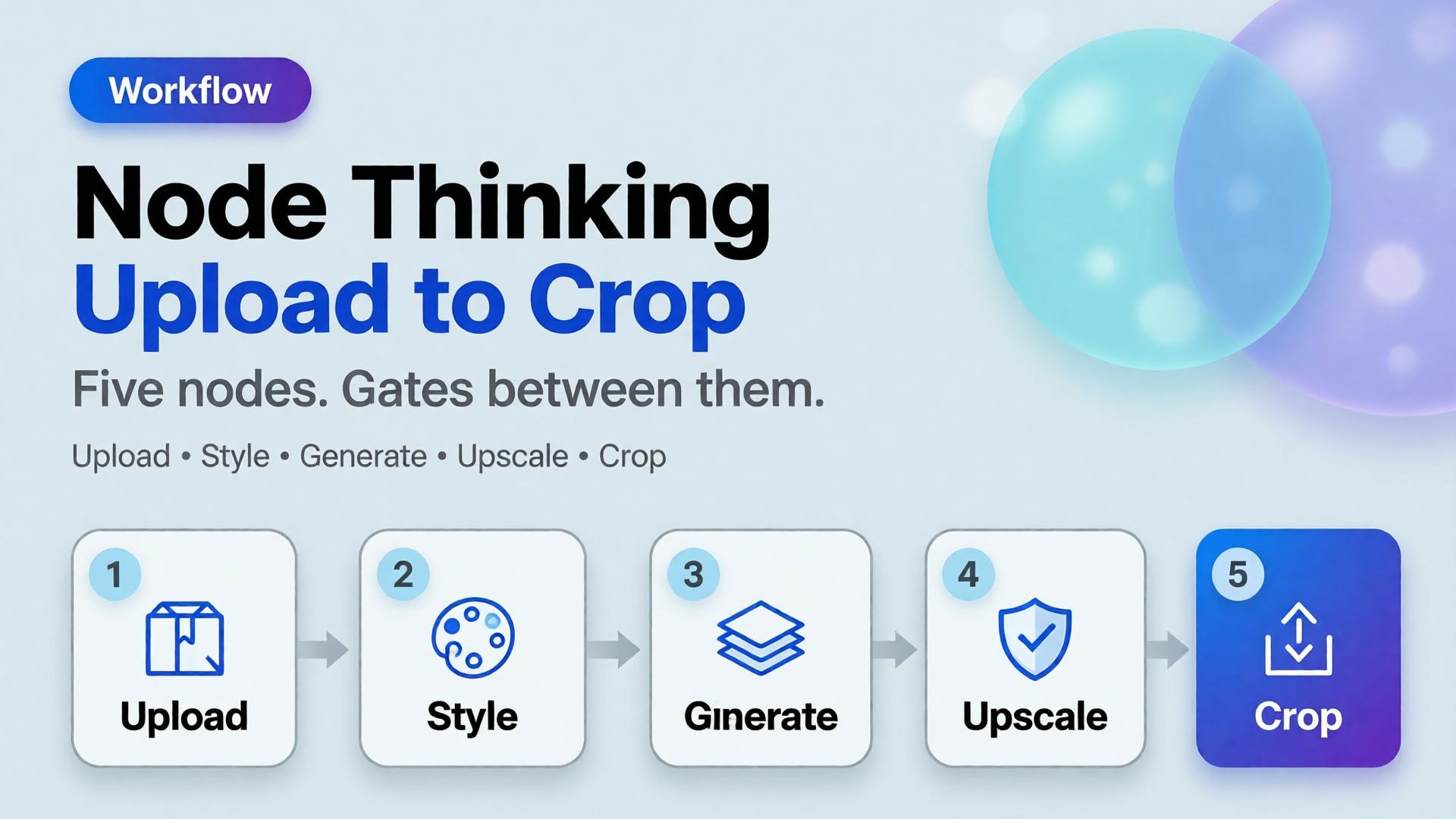
– The default ecommerce spine is five nodes: Upload → Brand Style → Generate → Upscale → Crop.
– Save the graph, not just the JPEG. Next drop should reuse the path with a new reference.
This article extends From Phone Photo to Campaign. That post is the SME mindset. This one is the builder pattern freelancers and design leads need when volume rises — sibling to one workflow for five clients.
Why Do “Pipelines” Still Feel Like Chaos?
Because teams automate pixels before they name jobs.
| Habit | What it optimizes | What breaks |
|---|---|---|
| New chat per task | Speed today | No memory tomorrow |
| Tool hopping by vibe | Novelty | Brand drift |
| Crop last, think never | File delivery | Wrong focal job per ratio |
| Upscale everything | Sharpness | Amplifies bad geometry |
| No gate | Throughput | Pretty failures ship |
Scattered stacks feel powerful until Friday’s format request. Then Orauria vs scattered AI stack becomes a lived experience, not a blog title.
A workflow builder does not make you faster at prompting. It makes you slower at skipping gates — which is how catalogs stay coherent.
What Is Node Thinking?
Node thinking is the habit of describing creative production as a graph:
- Each node has a single job
- Each node declares required inputs
- Each node enforces brand or geometry rules
- Each node ends with a curator gate (pass / reject / regenerate)
- Edges are intentional — not “whatever tab is open”
It is the production twin of a 3-line brief: brief sets direction; nodes execute it without renegotiating identity every step.
The Five-Node Ecommerce Spine
1. Upload — lock the reference truth
Job: ingest the honest product reference (phone packshot, shelf photo, studio plate).
Gate:
- Label readable?
- Geometry usable?
- Color approximately true?
Fail here and every later node invents a product.
2. Brand Style — lock the world rules
Job: attach palette, light logic, no-go list, character rules if a face appears.
This is where batch thinking lives. Without Brand Style as a node, Generate becomes fashion roulette.
Gate:
- Kit selected?
- Season / campaign tag set?
- Forbidden styles listed?
3. Generate — create against the brief, not against vibes
Job: produce candidates for a named slot (hero, lifestyle, demo still) using SCENE or a 3-line brief.
Gate:
- Matches brief job?
- Product fidelity hold?
- No new brand personality?
Adobe’s finding that 57% of creators still edit AI outputs heavily is not an excuse to skip direction. It is why Generate must be gated — editing without a checklist just polishes drift.
4. Upscale — sharpen only what already passed
Job: increase resolution for marketplace or print-adjacent crops.
Gate:
- Did upscale invent texture or typography?
- Edges still true to package?
Never upscale rejects. Upscale is not forgiveness.
5. Crop — assign channel jobs
Job: express one approved master as a ratio family — feed, story, cover — without redesigning the scene.
This is marketplace banner thinking as a node, not a Friday panic.
Gate:
- Focal subject survives each ratio?
- Logo / claim safe zones clear?
- Same campaign read across sizes?
How Do You Draw the Graph for a Real Drop?
Example: 20 SKUs, one brand kit, TikTok Shop + marketplace cover.
| Node | Runs once per | Output |
|---|---|---|
| Upload | SKU | Reference locked |
| Brand Style | Drop | Kit attached to all SKUs |
| Generate | SKU × scene family | 2–3 candidates |
| Upscale | Winners only | Delivery masters |
| Crop | Master × channel | Feed / Story / Cover set |
Notice Brand Style is once per drop, not once per SKU. That single decision is what keeps soul at catalog scale.
Node Thinking vs Prompt Thinking
| Prompt thinking | Node thinking |
|---|---|
| “Make it better” | “Pass Upload gate” |
| New adjectives each time | Fixed kit + slot brief |
| Hope the model remembers | Graph stores the path |
| Deliver files | Deliver a reusable system |
| Freelancer rebuilds Monday | Freelancer swaps kit slot |
Freelancers who bill for setup hours are usually missing node thinking. The template is the product — see freelancer workflow playbook.
What Belongs Outside the Default Spine?
Add nodes only when the job is real:
- Background remove before Generate when marketplace compliance demands it (background removal)
- Character lock when a face repeats across formats
- QA packshot checklist when geometry risk is high (packshot thinking)
- Translate / localize text-in-image for cross-border — as a gated node, not a surprise regenerate
Do not add nodes for novelty. Every node is a place identity can break.
Soft CTA
Build ecommerce creative as a graph, not a scavenger hunt: Orauria Workflow · Studio Guide
Frequently Asked Questions
What is an AI workflow builder for ecommerce?
It is a system that chains creative jobs — reference ingest, brand style, generation, upscale, crop — with rules and gates so catalogs stay coherent across channels.
Do I need software called “workflow builder” to practice node thinking?
No. Node thinking is a design discipline. A builder product makes the graph durable; a spreadsheet of stages with pass/fail still beats tab chaos.
Where should creative direction sit in the graph?
Before Generate. Direction is an input to the Generate node (brief + kit), not a vibe applied after upscale.
How is this different from phone-to-campaign workflow?
Phone-to-campaign is the journey metaphor for SMEs. Node thinking is the engineering pattern for repeating that journey without rebuilding it.
Should every SKU regenerate from scratch?
No. Reuse Brand Style and Crop recipes. Swap Upload references. Regenerate only when the scene family or product truth changes.
What is the biggest failure mode?
Skipping gates because a frame “looks fine alone.” Nodes exist so you review the path, not just the PNG.
Conclusion
Upload. Brand Style. Generate. Upscale. Crop.
Five nodes. One brand kit. Gates between them. That is AI workflow builder ecommerce in practice — not another prompt trick.
Save the graph. Next week’s drop should inherit it. The teams that scale AI creative are not the ones with the most tabs open. They are the ones who named the jobs — and refused to ship anything that failed a gate.
References
- Adobe, 2026 Creators’ Toolkit Report, June 16, 2026. https://news.adobe.com/news/2026/06/creators-toolkit-report-2026
- Adobe, Inaugural Creators’ Toolkit Report (Adobe MAX 2025), October 28, 2025. https://news.adobe.com/news/2025/10/adobe-max-2025-creators-survey