Mental models, art direction, and creative strategy with AI — frameworks for lookbooks, brand consistency, and new ways to think about visual production.
Moodboard Before Render: Why Designers Still Need This Step
The fastest way to waste an afternoon with AI is to skip the slowest step: the moodboard.
Teams open an image model, type "premium lifestyle product shot," generate twenty variations, pick three they like, and discover on Friday that marketing needs eight more scenes in the same world — and none of the new renders match Tuesday's winners. The model did not fail. The moodboard gate did.
An AI moodboard workflow is not nostalgia for pre-digital art direction. It is the pre-render contract — light temperature, palette, emotional register, composition habits — that turns exploration into a system you can scale.
Key Takeaways
>
> – Moodboard before render = lock direction before pixels. Without it, AI exploration produces orphans, not campaigns.
> – Adobe's 2026 Creators' Toolkit Report: 57% say AI outputs need moderate or extensive editing before publish — much of that editing is unfixed direction, not bad models (Adobe, 2026).
> – A working moodboard answers four questions: What light? What palette? What feeling? What composition habits?
> – Moodboard is the bridge between explore mode and reference-heavy scale.
> – Skilled designers still moodboard — especially when AI is the camera (lookbook thinking).
If you have read When to Use Reference Images vs Let AI Explore, you know exploration and scale are different modes. The moodboard is what you lock when exploration ends — the artifact that says: this world, not those twenty other worlds we tried.
What Is a Moodboard in an AI Creative Workflow?
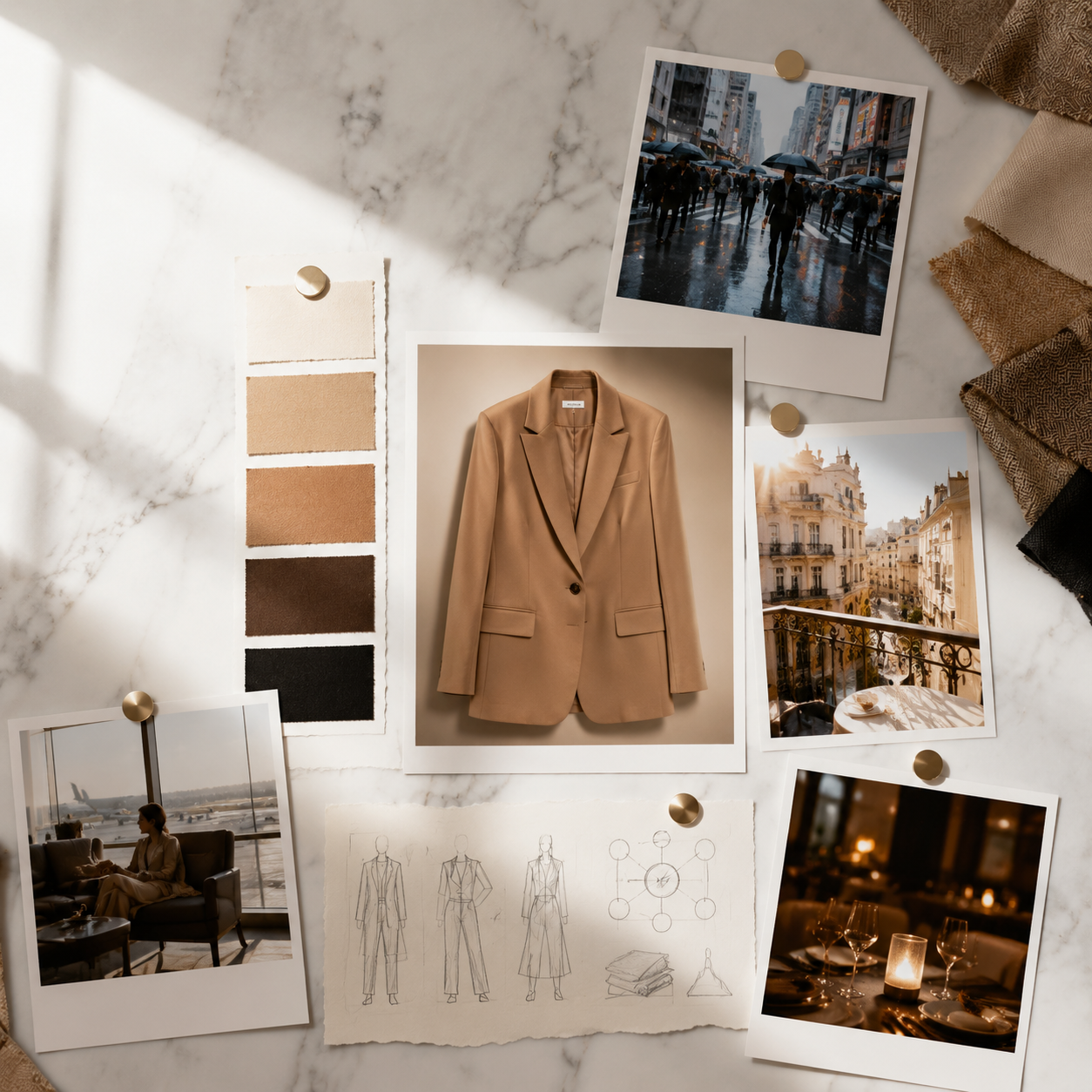
A moodboard in 2026 is not a Pinterest dump. It is a directional lock — typically 5–12 frames that define:
Dimension
What the moodboard locks
What it prevents
Light
Time of day, temperature, direction, hardness
Random neon vs soft window drift
Palette
Dominant hues, accent rules, neutrals
SKU 40 in a different color universe
Emotion
Calm, urgency, aspiration, intimacy
Mixed emotional registers in one gallery
Composition
Distance, crop, product-to-frame ratio
Inconsistent scale across scenes
Environment type
Kitchen, commute, bathroom — not specific props
Stock photo roulette
The moodboard does not need to include your product. It often should not. It defines the world; product references attach separately in reference mode.
Why Did Teams Think AI Made Moodboards Optional?
Three myths enabled the skip:
1. "The prompt is the brief." Prompts describe one frame. Moodboards describe a family of frames — the visual dialect every scene must speak.
2. "We will fix it in post." Adobe reports 57% of AI outputs need meaningful editing before publish (2026). Post fixes one image. It does not fix a catalog that drifted across fifty SKUs.
3. "Exploration is the deliverable." Exploration finds options. The deliverable is a curated set in one world — the lesson from our eight-scene experiment.
What Belongs on a Pre-Render Moodboard?
Minimum viable moodboard (5 frames)
Light reference — one frame defining temperature and direction
Palette anchor — swatches or a scene with correct dominant hues
Environment type — the room/street/shelf logic, not luxury clichés
Emotion reference — one frame that nails the feeling (calm, energy, intimacy)
Composition habit — distance and crop logic for the batch
Extended moodboard (8–12 frames)
Add: negative references (what to avoid), texture/material examples, character/talent tone if applicable, and one hero product placement sketch — not a final render, a layout intention.
The moodboard is the human-readable version of what Brand Style encodes in software. Both should agree — if they diverge, trust the signed-off board.
Lock direction before render on Orauria:Try Orauria
Frequently Asked Questions
Do I still need a moodboard if I have Brand Style presets?
Yes. Brand Style enforces rules; the moodboard chooses which world this job lives in. Presets without direction still drift.
Can the moodboard be AI-generated images?
Yes — if they are curated exploration winners, not random generations. Exploration produces candidates; moodboard locks the selection.
How many frames is enough?
Five for a minimum viable board. Eight to twelve for complex fashion or multi-channel campaigns.
How long should moodboarding take?
Under one hour for most ecommerce jobs. If it takes days, the brief is not decided yet — fix 3-line brief first.
Is moodboard only for fashion?
No. Beauty needs ritual environments. FMCG needs desk and shelf worlds. Any SCENE-driven job benefits from pre-render lock.
When can I skip the moodboard?
Single-frame exploration with no scale intent — mood discovery only. The moment you need a set, the board returns.
Conclusion
AI did not retire the moodboard. It relocated it — from wall pin-up to pre-render gate in every pipeline that ships more than one image.
Write the world sentence. Curate five frames. Sign off before the batch. Let SCENE and references do the rest.
Designers who still moodboard are not clinging to the past. They are refusing to pay for direction drift in pixels — one render at a time, one hundred SKUs at a time.
Every AI creative project starts with the same fork in the road. Lock the references — product geometry, model face, brand palette — and generate variations that stay on brief. Or open the exploration — let the model search for worlds, moods, and scenes you have never visualized before.
Choose wrong and you waste a week. Reference-heavy when you needed discovery produces safe, boring sameness. Exploration-heavy when you needed continuity produces gorgeous drift — twelve images that do not belong to the same brand.
This is a decision guide, not a tool tutorial. By the end you will know which mode your brief requires, how to blend both, and where each fits in lookbook thinking and AI ecommerce design.
The fork: lock what must stay true, or search for worlds you have not visualized yet.
Key Takeaways
Reference-heavy when continuity is the brief: same face, same product, same brand silhouette across formats.
Exploration-heavy when the world is unknown: new season, rebrand, first lookbook, pitch mood discovery.
Adobe's 2025 survey found 85% of creators would consider AI that learns their creative style — because consistency is harder than first render (Adobe MAX 2025, 2025).
The best pipelines explore first, reference second for new lines — and reference first, explore never for SKU scale.
What Is the Difference Between Reference Images and Open Exploration?
Reference images anchor generation. You upload product shots, model faces, moodboard frames, or brand examples — and the AI is constrained to respect them. Shape, color, character, composition habits travel downstream.
Open exploration removes anchors. You describe worlds, emotions, and contexts — and the AI searches broadly. Discovery is the goal. Consistency is deferred until something worth protecting appears.
Mode
Primary question
Risk
Reward
Reference-heavy
"Keep this exact truth across scenes"
Safe, repetitive if over-constrained
Scale without drift
Exploration-heavy
"What world could this product inhabit?"
Aesthetic drift, orphans
Breakthrough mood, new direction
Blended
"Find the world, then lock it"
Process discipline required
Best of both
In 2026, Adobe found 85% of creators insist the final creative decision must remain theirs (Adobe Creators' Toolkit Report, 2026). References and exploration are inputs. Curation is still the human job.
When Should You Use Reference Images?
Use references when the brief has a continuity requirement — something that must not change between outputs.
Reference-heavy scenarios
Scenario
What to reference
Why
SKU scaling
Product packshots, label details
Bottle shape cannot drift across 50 SKUs
Character-led campaigns
Model face, posture rules
Same person across 12 formats
Campaign extension
Prior season hero frames
New scenes must match established world
Marketplace compliance
Approved hero angle
Main image must match listed product
Brand refresh (partial)
Logo, palette, typography rules
Evolution, not reinvention
If your SCENE map has eight contexts for one product, references protect product geometry and character while contexts change around them. That is the core of the eight-scene experiment: explore scenes, reference the outfit.
What to upload as references
Product truth pack — phone or studio shots showing honest shape and color
Character sheet — face, hair, posture language (if human-led)
Moodboard anchors — 3–5 frames locking light temperature and palette
Adobe's 2025 data shows 48% of creators use creative AI for ideation and brainstorming, while 52% use it for generating new assets (Adobe MAX 2025, 2025). Exploration and production are different jobs. Assign them explicitly.
Exploration rules that prevent chaos
Time-box — 90 minutes of open generation, then stop
No approval during exploration — explorer role only
Cluster outputs — group by mood, not by prettiness
Pick one cluster — curator chooses direction
Then switch to references — lock what won
Exploration without a gate produces folders of orphans. The gate is a moodboard decision, not a model upgrade.
Exploration phase: cluster outputs by mood, not prettiness — then pick one direction.
What Is the Blended Workflow (Explore → Lock → Scale)?
Most professional pipelines use three phases:
Phase 1: EXPLORE (open)
    → Generate 20–40 mood frames, no product yet
    → Curator picks 1 world direction
Phase 2: LOCK (references + moodboard)
→ Upload winning frames as style anchors
→ Define Brand Style + character rules
→ Write SCENE map for hero SKU
Phase 3: SCALE (reference-heavy)
→ Generate scene family per SCENE row
→ Adapt per channel
→ Save workflow template `
This is phone-to-campaign logic for teams with studio assets — and AI ecommerce design logic for everyone: find the world, protect it, repeat it.
Phase 2 Lock: winning exploration frames become reference anchors for scale.
Project phase
Dominant mode
Pitch / concept
Exploration
Client approval
Exploration → Lock transition
Launch production
Reference-heavy
Catalog extension
Reference-only
Season refresh
Blended (explore accents, reference core)
Quick Decision Tree: Which Mode Is Your Brief?
Answer three questions:
1. Does the product or face already exist in approved assets?
– No → Start with exploration
– Yes → Reference the truth pack
2. Is the commercial world already defined?
– No → Exploration for mood and context
– Yes → Reference moodboard + SCENE map
3. Is the deliverable one direction or twelve matching formats?
– One direction / pitch → Exploration OK
– Twelve matching formats → Reference-heavy required
Decision matrix
Brief type
Reference
Explore
Blend
New fashion lookbook (season 1)
Low
High
Medium
Campaign extension (season 3)
High
Low
Medium
100-SKU beauty catalog
High
Very low
Low
Rebrand pitch (3 directions)
Low
High
—
TikTok ad variant test
Medium
Medium
High
Character-led video series
High
Low
Medium
The decision tree ends with a human gate — explorer generates, curator locks direction.
What Are Common Mistakes With References and Exploration?
Mistake
Symptom
Fix
Reference too late
Product shape wrong in all scenes
Upload truth pack before scene 1
Explore too long
200 images, no direction
90-minute time-box + cluster
Reference moodboard only
Pretty but wrong product
Separate product refs from style refs
Explore during scale
Drift across SKU batch
Switch to reference-only for catalog
Same person explores + approves
No taste gate
Split explorer / curator roles
No saved lock point
Re-explore every Monday
Document winning refs in Brand Style
Adobe reports 57% of creators say AI outputs need moderate or extensive editing before publish (2026). References reduce fundamental failure. Editing handles polish. Do not confuse them.
How Many Reference Images Should You Upload?
Use case
Recommended count
What they cover
Product SKU
3–5
Angles, label, scale
Character face
2–4
Front, 3/4, expression range
Mood / style
5–8
Light, palette, composition
Brand kit
Rules + 3 anchors
Hex, type, photo habits
More references is not always better. Conflicting references confuse the model — warm moodboard plus cool product shot plus neon brand guideline produces mush. Curate the reference set like you curate outputs.
How Does This Connect to Brand Style and Workflow?
Workflow template — saved node order for repeat runs
In workspaces like Orauria, Phase 2 (Lock) maps to Brand Style + reference upload nodes. Phase 3 (Scale) maps to saved workflows per SKU or scene batch.
Exploration finds what to save. References protect what you saved. Workflows replay what worked.
Explore and lock creative worlds on Orauria:Try Orauria
Frequently Asked Questions
Can I use reference images and exploration in the same session?
Yes — but sequentially, not simultaneously. Explore first without product references. Once direction wins, upload references and regenerate. Mixing both at minute zero produces muddled briefs.
Do reference images limit creativity?
They limit drift, not ideas. You can still place a referenced product in twelve contexts via SCENE. References constrain what must stay true; SCENE defines what may change.
What if I only have phone photos as references?
Phone photos are valid truth packs — especially for SMEs. Clean them for reference use (phone-to-campaign), then scale scenes around them.
When should freelancers default to exploration?
Pitch decks, first client concepts, and rebrand directions — anywhere the client must choose a world before production locks. Bill exploration as discovery; bill reference workflows as production.
How do I know exploration is finished?
When the curator can write a one-sentence world definition and pick 5–8 moodboard frames without hesitation. If you cannot write that sentence, exploration continues.
Is open exploration risky for brand reputation?
It is risky to publish exploration outputs without curation. Exploration itself is low risk in private — publishing without a lock phase is where brands break identity.
Conclusion
Reference images and open exploration are not rivals. They are phases.
Explore when the world is unknown. Reference when the world must survive scale. Blend when the season is new but the brand is not.
The wrong question is "which mode is better?" The right question is "which mode is this brief?" — then run the pipeline that matches.
Most AI product images fail for a boring reason: the prompt describes the object, not the story. "A serum bottle on a marble counter" is not creative direction. It is inventory. The shopper does not buy marble. They buy the morning ritual, the skin confidence, the version of themselves that appears in the mirror before a hard day.
AI product storytelling is the discipline of placing a product inside believable commercial narratives — then generating images that prove the product belongs there. The SCENE method is the framework that makes those narratives repeatable across SKUs, seasons, and channels without aesthetic drift.
Key Takeaways
SCENE stands for Story, Context, Emotion, Narrative, and Extension — five questions to answer before any AI render.
In 2026, Adobe found 57% of creators say AI outputs need moderate or extensive editing before publish. SCENE front-loads the brief so editing fixes polish, not fundamental story failure.
One hero product mapped through four to six SCENE contexts beats twelve random angles on a grey background — for conversion and for brand coherence.
SCENE works beyond fashion: beauty, F&B, home, and electronics all sell through context and emotion, not isolation.
If you arrived from lookbook thinking, you have already seen SCENE applied to a camel blazer across four worlds. This article generalizes the method for any product category — and connects it to the larger discipline of AI ecommerce design.
SCENE starts on paper — or in a brief doc — before any AI model opens.
What Is the SCENE Method?
SCENE is a pre-render framework. Before you open any image model, you answer five dimensions for each product or hero SKU:
Letter
Dimension
Core question
S
Story
What micro-story does this single frame tell?
C
Context
Where is the product — physically and in the buyer's life?
E
Emotion
What should the viewer feel in under two seconds?
N
Narrative
How does this frame connect to the frames before and after it?
E
Extension
What other scenes could this product inhabit without breaking character?
In 2026, Adobe's Creators' Toolkit Report found that 87% of creators using creative AI say it has accelerated business or audience growth — yet 85% insist the final creative decision must remain theirs (Adobe Creators' Toolkit Report, 2026). SCENE is built for that reality: AI explores the scenes; humans define the story and approve what ships.
Beauty SCENE in practice: context and ritual, not sterile product isolation.
Why Do AI Product Images Fail Without a Story Framework?
They fail because teams confuse catalog clarity with commercial persuasion.
Catalog clarity answers: What is this product? What are its dimensions? What color is it?
Commercial persuasion answers: Why does this product belong in my life right now?
Three failure modes repeat across categories:
Object-first prompting. "Generate a photo of a coffee bag" produces a bag. It does not produce desire, ritual, or morning warmth.
Scene without sequence. Each image is individually fine. Together they feel like a stock photo mood board — not a brand chapter.
No extension plan. The team renders one hero and stops. Marketing later asks for ads, email headers, and marketplace crops — and every new prompt drifts from the original.
Adobe's 2025 inaugural survey found 48% of creators use creative AI for ideation and brainstorming, while 52% use it for generating new assets (Adobe MAX 2025 survey, 2025). SCENE sits upstream of both: it is the ideation structure that makes generation intentional.
How Do You Apply Each Letter of SCENE?
S — Story: One frame, one moment
Every product image is a frozen scene from a longer film. Name that scene in one sentence.
Weak: "Skincare serum product shot."
Strong: "First light hits the bathroom shelf; she reaches for the serum before the city wakes up."
The story does not need drama. It needs specificity. Vague stories produce vague images.
C — Context: Physical place + social meaning
Context has two layers:
Physical: kitchen counter, gym locker, office desk, hotel bathroom
Social: alone, with partner, at work, preparing for an event
A protein powder on a gym bench and the same powder on a Sunday kitchen island tell different stories — even if the product is identical.
E — Emotion: The feeling that closes the gap
Name one primary emotion per frame. Not three. One.
Emotion
When it works
Calm
Wellness, skincare, home
Ambition
Professional tools, fashion, tech
Warmth
Food, family products, gifts
Playfulness
Creator tools, youth brands
Confidence
Beauty, fitness, career products
Emotion is the bridge between scroll and stop. If you cannot name it, the image will not carry it.
N — Narrative: How frames connect
Narrative is sequence logic. Ask: if these images were a carousel, would they feel like chapters or like shuffle mode?
Example sequence for a reusable water bottle:
Morning fill at home (hydration habit)
Gym floor beside mat (performance context)
Desk beside laptop (workday companion)
Evening park bench (recovery wind-down)
Same bottle. Four chapters. One product story.
Narrative is sequence logic — each frame should feel like the next chapter, not shuffle mode.
E — Extension: Plan the family before you render
Extension prevents the "we need five more images by Friday" panic. Before the first render, list every scene the product must inhabit this quarter: PDP gallery, paid social, email hero, marketplace, seasonal campaign.
Extension is where AI ecommerce design meets SCENE: one creative direction, many formats.
What Does SCENE Look Like Across Product Categories?
F&B SCENE: the story is ritual and warmth, not just the bag on white.
Food & Beverage: Specialty coffee bag
Scene
Story
Context
Emotion
1
Slow Sunday
Kitchen island, pour-over setup
Unhurried warmth
2
Work-from-home
Desk beside laptop, ceramic mug
Focused comfort
3
Friends over
Dining table, shared pot
Social connection
4
Gift shelf
Pantry display, handwritten tag
Thoughtful giving
Home: Minimal desk lamp
Scene
Story
Context
Emotion
1
Late work session
Home office, blue hour through window
Quiet focus
2
Reading hour
Armchair, book, warm pool of light
Restful intimacy
3
Student setup
Compact desk, notebook stack
Ambitious clarity
Fashion: (recap from lookbook thinking)
The camel blazer example from Your Lookbook Doesn't Need a Studio — Monday momentum, Saturday slow, red-eye ready, after hours — is SCENE applied to apparel. Fashion is not a separate method. It is SCENE with a human character at center frame.
How Many SCENE Contexts Should One Product Have?
Start with four to six scenes per hero SKU. That is enough narrative range for a launch week without drowning in production.
Product stage
Recommended SCENE count
New launch / hero SKU
4–6 scenes
Catalog extension
2–3 new scenes per seasonal refresh
Marketplace-only SKU
3 scenes minimum (hero clarity + 2 context)
Full campaign drop
6–8 scenes across channels
Adobe reports that 93% of creators say AI helps them produce content faster (Adobe Creators' Toolkit Report, 2026). SCENE channels that speed: you are not generating twenty random variations. You are filling a predetermined scene grid.
A SCENE brief takes 15–30 minutes. Re-prompting orphans takes days.
What Is a SCENE Brief Template You Can Use Today?
Copy this before your next render session:
PRODUCT: [name + category]
BUYER: [who, age range, life moment]
BRAND EMOTION: [one word — calm, ambition, warmth, etc.]
SCENE is thinking, not clicking. In practice, the method maps to a repeatable pipeline:
Write SCENE brief for hero SKU
Build moodboard from references (temperature, palette, emotion)
Generate scene variations per SCENE row
Curate 1 winner per scene — kill the rest
Adapt winners per channel format
Save brief + workflow as template for next SKU
For teams starting with phone photos instead of studio assets, see From Phone Photo to Campaign (coming soon). SCENE still applies — the reference image is just noisier at the start.
In workspaces like Orauria, SCENE rows become workflow nodes: reference upload → Brand Style → scene generation → upscale/crop per format → template save. The framework survives the toolchain change.
Map your next product story on Orauria:Try Orauria
Frequently Asked Questions
Is SCENE only for fashion and lookbooks?
No. SCENE originated in lookbook thinking but applies to any product sold through context: beauty, food, home, electronics, wellness. If your buyer imagines a life around the product, SCENE applies.
How long should a SCENE brief take to write?
Fifteen to thirty minutes for a hero SKU with four scenes. That is less time than re-prompting twenty orphaned images and trying to make them feel related afterward.
Can I use SCENE with only text-to-image tools?
Yes. SCENE is model-agnostic. It defines the brief before the tool. Whether you use Flux, Midjourney, or a multi-model workspace, the five questions stay the same.
What is the difference between SCENE and a creative brief?
A traditional creative brief is often a document. SCENE is a grid — one row per scene, five columns, built for batch production. It is brief structure designed for AI iteration speed.
How does SCENE help with AI product storytelling for SEO?
Search engines and AI assistants reward content that answers buyer questions clearly. SCENE-based galleries naturally produce image sets with descriptive alt text, coherent narratives, and FAQ-friendly context — which supports both PDP engagement and topical authority posts.
Should every scene include a person?
Not always. Some products — food, objects, decor — tell stories through environment alone. SCENE still applies: the "character" can be the room, the table, the hands, or the light — not necessarily a full model.
Conclusion
AI product storytelling is not about prettier packshots. It is about evidence — proof that a product belongs in a life the buyer recognizes.
SCENE makes that evidence systematic. Define the story before the object. Place the product in context. Name the emotion. Connect the frames. Plan the extension before the first render.
AI Ecommerce Design Is Not AI Image — Here Is the Difference
Open any ecommerce team's Slack channel after they "try AI," and the pattern repeats. Someone generates a stunning product shot. Everyone reacts. Then marketing asks for the TikTok version. Then the marketplace crop. Then the same model face on a banner. Then a video loop. Then someone notices the color drifted from the brand kit.
The team did not fail at AI. They failed at category confusion. They bought an AI image outcome when the business needed AI ecommerce design — a system that turns one creative direction into publishable commercial assets across channels without breaking brand coherence.
Key Takeaways
AI image answers: What does this product look like in one frame?AI ecommerce design answers: What commercial story does this product tell — and how does that story survive every format?
In 2026, Adobe's Creators' Toolkit Report found that 75% of creators describe creative AI as integrated or essential — yet 57% say outputs still need moderate or extensive editing before publish. Speed without a design system creates rework, not revenue.
Adobe's 2025 inaugural survey found 60% of creators use more than one creative AI tool in a three-month window — a signal that image generation alone rarely closes the commercial loop.
The shift from image to design is not more prompts. It is creative direction + brand guardrails + channel adaptation + reusable workflow.
If you have read Your Lookbook Doesn't Need a Studio. It Needs a World, you already know one piece of this puzzle: world-building beats studio thinking for fashion and lifestyle brands. AI ecommerce design is the larger frame — the discipline that connects lookbook thinking, product pages, paid social, marketplace listings, and campaign extensions into one coherent commercial language.
AI ecommerce design is not one render — it is the commercial system behind every touchpoint.
What Is the Difference Between AI Image and AI Ecommerce Design?
AI image is output. You describe a scene, select a model, render variations, pick a winner. The deliverable is a file.
AI ecommerce design is infrastructure. You define a commercial world — who buys this product, where they encounter it, what emotion closes the gap between scroll and cart — then produce a family of assets that all obey the same creative rules. The deliverable is a system: hero shot, lifestyle context, detail crop, social format, video still, voice-over script, all traceable to one brief.
In 2026, Adobe reported that 87% of creators using creative AI say it has accelerated business or audience growth, while 93% say it helps them produce content faster (Adobe Creators' Toolkit Report, 2026). Those numbers describe opportunity — not automatic quality. The same report found 57% of outputs need moderate or extensive editing before they are ready to share. In ecommerce, "editing" is not polish. It is fixing off-brand color, wrong aspect ratio, inconsistent model faces, and scenes that sell aspiration but fail to answer practical buyer questions.
One file, one frame: the AI image mindset stops here. Ecommerce design starts with the asset family.
Why Do Ecommerce Teams Confuse the Two?
Three habits cause the confusion — and all three feel productive in the moment.
1. Tool-first buying. A team licenses an image model, runs a workshop on prompting, declares victory. Nobody owns creative direction, brand rules, or channel specs. The tool becomes the strategy.
2. Channel-last thinking. Assets are generated in isolation: one hero for the website, another prompt for Instagram, a third tool for video. Each channel looks fine alone. Together, they look like three different brands.
3. Speed mistaken for scale. Adobe's 2026 report shows creators produce faster with AI — but faster single images do not equal faster catalogs, seasons, or campaigns. Scale in ecommerce means repeating a coherent visual language across hundreds of SKUs and dozens of formats without aesthetic drift.
Adobe's 2025 inaugural Creators' Toolkit Report offers a telling detail: 60% of creators used more than one creative generative AI tool in the prior three months to improve quality, experiment with capabilities, or match the right tool to the task (Adobe MAX 2025 survey, 2025). That is not failure. That is evidence that commercial creative work spans ideation, generation, editing, upscaling, adaptation, and distribution. Image generation is one station on the line — not the whole factory.
What Are the Five Layers of AI Ecommerce Design?
Before you evaluate tools, map the stack. AI ecommerce design has five layers. Skip one, and the system collapses back into random pretty images.
Layer
Question it answers
What breaks if you skip it
1. Creative Direction
What world does this product belong to?
Gorgeous orphans — images that do not belong together
2. Brand System
What must stay constant across every asset?
Color drift, typography chaos, wrong tone
3. Scene Production
What evidence proves the product fits a life?
Flat persuasion — no context, no desire
4. Channel Adaptation
What does each platform require?
Right image, wrong crop, wrong file, wrong moment
5. Workflow & Reuse
How does next week's batch start faster?
Reinventing the brief every Monday
The five layers live in practice: direction, brand, scenes, formats, and reusable workflow.
Layer 1: Creative Direction
This is where lookbook thinking and the SCENE method (publishing soon) live. You are not prompting "a photo of a serum bottle." You are defining Story, Context, Emotion, Narrative, and Extension for a buyer who discovers the product on a phone, compares alternatives in three tabs, and decides in under eight seconds.
Layer 2: Brand System
Brand is not a logo file. It is enforceable rules: palette, light temperature, composition habits, voice, character continuity. Adobe's 2025 survey found 85% of creators would consider using AI that learns their creative style — because consistency is the hard part, not the first render.
Layer 3: Scene Production
Ecommerce creative is moving from white-background clarity to scene-based persuasion. Fashion needs lifestyle contexts. Beauty needs bathroom counters and morning light, not sterile isolation — a pattern we explore in Lifestyle Context Mapping for Beauty Ads (coming soon). The scene is not decoration. It is the argument for why this product fits a real life.
Layer 4: Channel Adaptation
A hero image is not a TikTok Shop thumbnail. A lookbook frame is not an Amazon main image. AI ecommerce design plans formats up front: aspect ratios, safe zones, text overlay zones, motion crops. Adaptation is design work — not an afterthought resize.
Channel adaptation is design work: each platform needs its own crop, safe zone, and context.
Layer 5: Workflow and Reuse
The test of maturity: can you run next month's drop without rewriting the creative logic from scratch? Saved workflows, brand presets, reference libraries, and batch templates turn one season's thinking into next season's head start. See From Phone Photo to Campaign: A Workflow Mindset for Small Brands (coming soon) for how this mindset applies when you start with almost nothing.
When Does a Single AI Image Become a Commercial Creative System?
The transition happens when three conditions are true:
The brief is commercial, not descriptive. "Generate a red dress" is an image brief. "Show this dress in three contexts our buyer actually inhabits — commute, dinner, weekend travel — with the same light logic and palette" is an ecommerce design brief.
Outputs are planned as a set, not a single winner. You know in advance you need a marketplace hero, two gallery lifestyle frames, one detail macro, one paid-social crop, and one video loop source. The set is the unit of work — not the one image that tested well in Discord.
A human curator signs the system, not just the file. Adobe found in 2026 that 85% of creators insist the final creative decision must remain theirs, whether the tool is generative or agentic. AI ecommerce design respects that: explore widely, decide deliberately, publish only what belongs in the same commercial world.
What Breaks When You Treat AI Like a Photo Booth?
Treating AI as a photo booth — insert prompt, receive image, move on — produces predictable commercial failures:
Photo booth habit
Commercial consequence
New prompt every asset
Brand drift across PDP, ads, and email
No reference system
Different model face on every format
No channel plan
Constant rework for crops and specs
No saved workflow
Every launch week starts at zero
No curator role
Volume without point of view
Adobe's 2026 report notes that 53% of creators who find it harder to stand out blame the sheer quantity of content online, while 42% say AI-generated work makes it harder for distinctive voices to surface. In ecommerce, that translates directly: more product images do not automatically mean more conversion. Coherent commercial storytelling does.
When drift appears, the fix is rarely "a better model." Read Brand Consistency Trap: 5 Times AI Broke Your Visual Identity (coming soon) for the failure modes — and how teams recover by returning to brand system and creative direction, not prompt tweaking.
How Does AI Ecommerce Design Connect to Conversion?
AI ecommerce design is not abstract theory. It maps to how shoppers actually decide.
Product pages need clarity and context in deliberate order: a clean hero for trust and comparison, lifestyle frames deeper in the gallery for desire and scale. Teams that plan only one AI image often optimize for the wrong slot — a beautiful lifestyle render where the marketplace requires a compliant packshot, or a sterile white background where the ad feed needed emotion.
The design question is not "which image is prettier?" It is which image does which job in the funnel — and can your system produce the full set without breaking character?
That is why world-building from lookbook thinking scales down to SKU pages and up to campaigns. One creative direction propagates:
Hero lookbook scenes → cropped for product detail pages
Lifestyle frames → adapted for paid social and short video
Character continuity → reused in voice and motion later
Brand Style rules → enforced across the next 100 SKUs
If you treat AI as image generation, you rebuild every asset from scratch for each channel. If you treat it as ecommerce design, one direction becomes a commercial kit.
Conversion happens when clarity and context work together — not when one pretty image does every job.
AI Image vs AI Ecommerce Design: A Side-by-Side View
Dimension
AI Image
AI Ecommerce Design
Unit of work
One file
One asset family
Brief type
Descriptive prompt
Commercial creative direction
Brand role
Optional
Enforced (palette, style, character)
Channel awareness
Rare
Built in (crop, format, placement)
Reuse
Low — start over next time
High — workflows and templates
Success metric
"Does it look good?"
"Does the set convert and stay on-brand?"
Human role
Prompt writer
Curator + art director
Tool count
Often one
Often several — by design
Adobe's 2025 data supports the last row: 55% of creators use creative AI for editing, upscaling, and enhancement; 52% for generating new assets; 48% for ideation and brainstorming. Ecommerce design uses all three modes — not just generation.
When Should You Use Reference Images vs Open Exploration?
Use reference-heavy workflows when continuity is the brief: same product details, same model face, same brand silhouette across formats. Use exploration-heavy workflows when you are discovering the commercial world for a new line, rebrand, or first-season lookbook.
We unpack the full decision tree in When to Use Reference Images vs Let AI Explore (coming soon). The short version for ecommerce teams: exploration finds the world; references protect it during scale.
A Brief Note on Tools (Not a Tutorial)
This article is about category clarity, not button clicks. Still, teams ask where ecommerce design lives in practice.
In workspaces built for commercial creative — including Orauria — the five layers map to a repeatable pattern:
Map scenes with creative direction (SCENE, lifestyle contexts)
Generate variations across image — and extend to video, voice, copy when needed
Upscale, crop, and export per channel
Save the workflow as a template for the next drop
The value is not that one model makes one beautiful image. The value is that the creative direction survives the whole pipeline — from first scene to fiftieth SKU.
Build commercial creative systems on Orauria:Try Orauria
Frequently Asked Questions
Is AI ecommerce design just a fancy name for AI product photography?
No. Product photography is one output type inside a larger system. AI ecommerce design includes creative direction, brand enforcement, multi-format adaptation, and reusable workflows — so teams do not regenerate the same commercial logic for every channel and every SKU.
Do I need AI ecommerce design if I only sell on one marketplace?
Even single-channel sellers need more than one image type: hero, angles, lifestyle context, detail shots. AI ecommerce design plans that asset family up front. One marketplace does not mean one image — it means one coherent visual argument with multiple proofs.
Can I start with AI image tools and upgrade to ecommerce design later?
Yes — most teams do. The upgrade happens when you add brand rules, scene mapping, channel specs, and saved workflows. The risk is waiting too long: every orphaned image becomes debt you must redo when you scale to ads, email, or new SKUs.
What is the first step if my team only generates one-off AI images today?
Write a three-line commercial brief before the next prompt: who buys, where they see the product, what feeling should close the gap. Then list every format you need this week. That shift from "make a picture" to "design a set" is the practical start of AI ecommerce design.
How does this relate to AI lookbook thinking for fashion brands?
Lookbook thinking is a spoke inside AI ecommerce design — the world-building layer for fashion and lifestyle. A lookbook defines aspiration; ecommerce design ensures that aspiration survives product pages, ads, and catalog scale. Start with lookbook thinking if fashion is your entry point.
Will AI replace my designer or agency?
Adobe's 2026 report found 85% of creators insist the final creative decision must remain theirs. AI ecommerce design does not remove designers — it changes their job from manual production to direction, system design, and curation. The scarce asset is taste, not generation speed.
Conclusion
The ecommerce industry does not need more random AI images. It needs commercial creative systems — briefs that start with buyers, brand rules that survive every format, scenes that persuade in context, and workflows that make next month faster than this one.
AI image tools are excellent at the render. AI ecommerce design is accountable for the outcome: a coherent visual language that turns attention into trust, and trust into cart.
Stop asking whether AI can make your product look good. Start asking whether your team can design the whole commercial story — and publish it everywhere without the brand falling apart.